

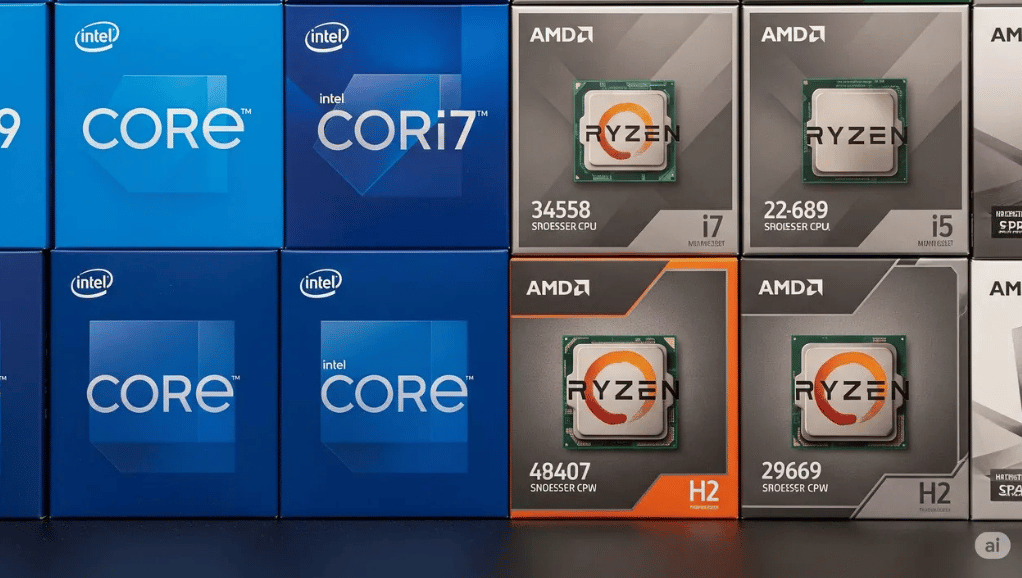
AMD vs Intel for gaming remains one of the most debated topics among PC enthusiasts and gamers, as both brands offer distinct advantages depending on the type of gaming experience you’re after. Intel processors have long been favored for their high single-core clock speeds, which translate into slightly higher FPS in competitive and CPU-intensive games, such as CS2, Valorant, or other esports titles where every millisecond counts.
AMD, however, has transformed the gaming landscape with its Ryzen series, offering processors with higher core and thread counts that excel in modern AAA games, open-world titles, and multitasking scenarios like streaming while gaming. AMD’s 3D V-Cache technology further enhances gaming performance by reducing bottlenecks in CPU-heavy scenarios, allowing for smoother frame delivery and better responsiveness.
| Aspect | AMD | Intel | Notes / Verdict |
| Single-Core Performance | Slightly lower in older games; improved with Ryzen 7000 series | Higher clock speeds, strong single-core FPS advantage | Intel is slightly better for CPU-bound and esports titles |
| Multi-Core Performance | More cores/threads at a similar price, excels in AAA games, streaming, and multitasking | Hybrid P-core/E-core design improves background tasks and mixed workloads | AMD is stronger in modern multi-threaded games and content creation |
| Architecture | Unified core design, strong multi-threading, 3D V-Cache, efficient manufacturing | Hybrid P-core & E-core, high clock speeds, advanced Windows scheduling | AMD’s 3D V-Cache boosts CPU-bound game performance; Intel excels in lightly threaded tasks |
| Gaming FPS Trends | Slightly smoother frame pacing at 1080p, negligible difference at 1440p/4K | Slightly higher peak FPS at 1080p, GPU-bound at higher resolutions | Differences shrink as the GPU becomes the bottleneck |
| Power Efficiency & Thermals | Lower power consumption, cooler operation, and mid-range cooling is sufficient | Higher power draw, runs hotter, requires stronger cooling | AMD is better for efficient, quiet gaming setups |
| Price-to-Performance | Better value, competitive mid-range CPUs, longer motherboard support | Premium pricing, frequent platform changes, and higher overall cost | AMD offers the best performance-per-dollar |
| Platform Longevity | Longer socket support, easier upgrades, long-term investment | Frequent socket changes, a new motherboard is needed for upgrades | AMD wins for upgrade flexibility |
| Best Gamers / Use Case | AAA games, open-world, long gaming sessions, streamers, budget gamers | Competitive esports, maximum FPS, lightly threaded games | Choice depends on gamer type and priorities |
| Software / Driver Support | Improved drivers, better stability for modern games | Strong Windows optimization, advanced scheduling | Both now provide reliable, modern gaming support |
| Recommendation | Multi-core efficiency, power efficiency, affordability, and long-term upgrade | Slight FPS edge in competitive gaming, high clock speeds, mixed workloads | AMD recommended for most gamers; Intel slightly better for esports and single-core focused games |
AMD vs Intel for Gaming

AMD vs Intel for gaming has been one of the most closely watched rivalries in the PC hardware world, and for good reason. Both companies offer high-performance processors, but they approach gaming performance differently. Intel CPUs traditionally excel in single-core performance, delivering slightly higher frames per second (FPS) in CPU-bound or competitive esports titles, which rely on raw clock speeds and low latency.
On the other hand, AMD processors have made significant strides in recent years, particularly with their Ryzen lineup and 3D V-Cache technology, offering superior multi-core performance and better efficiency in modern AAA games that utilize multiple threads. AMD CPUs are generally more power-efficient, run cooler, and provide better value for money.
Intel’s processors, meanwhile, shine in games that benefit from high single-core performance and deliver robust performance across mixed workloads, such as gaming while streaming or running background applications. Ultimately, the choice between AMD vs Intel for gaming depends on the user’s priorities: if maximum FPS in competitive titles is the goal, Intel may hold a slight edge; if multi-core efficiency, power efficiency, and long-term value are more important, AMD is often the better choice.
Understanding CPU Importance in Gaming
While GPUs handle most graphical workloads, the CPU plays a critical role in:
- Frame rate consistency
- Game physics and AI calculations
- Open-world streaming and background tasks
- Competitive gaming responsiveness
A powerful gaming CPU ensures smooth gameplay, minimal stuttering, and better performance in CPU-intensive titles.
Gaming Performance Overview
Single-Core Performance
- Intel Advantage: Intel CPUs traditionally excel in single-core performance, which benefits older games and competitive esports titles like CS2, Valorant, and League of Legends. Higher clock speeds and aggressive boost algorithms often give Intel a slight edge in raw FPS.
- AMD Progress: Modern AMD Ryzen processors have narrowed the gap significantly. In many modern games, the difference between AMD and Intel is now within a few frames per second.
Multi-Core Performance
- AMD Strength: AMD CPUs generally offer more cores and threads at similar price points, making them excellent for modern AAA games optimized for multi-core usage.
- Intel Hybrid Approach: Intel’s newer CPUs use a mix of performance cores (P-cores) and efficiency cores (E-cores), improving multitasking and background performance during gaming.
CPU Architecture Differences

| CPU Architecture | Key Features | Performance Highlights |
| AMD Ryzen Architecture | Unified core design, strong multi-threading performance, excellent cache optimization (especially in X3D models), efficient manufacturing process | AMD’s 3D V-Cache technology boosts performance in CPU-bound games, delivering superior multi-core efficiency and smoother gameplay in modern titles. |
| Intel Core Architecture | Hybrid P-core and E-core design, high clock speeds, advanced scheduling for Windows, strong performance in lightly threaded games | Focuses on raw speed and task distribution, excelling in lightly threaded games and mixed workloads, offering high single-core performance for gaming and multitasking. |
Gaming FPS Benchmarks (General Trends)
While exact numbers vary by game and GPU, common trends include:
- 1080p Gaming: CPU differences are most noticeable. Intel may deliver slightly higher peak FPS, while AMD offers smoother frame pacing.
- 1440p Gaming: Differences narrow significantly as the GPU becomes the bottleneck.
- 4K Gaming: Minimal difference between AMD and Intel CPUs; GPU choice matters far more.
Power Efficiency and Thermals
AMD CPUs
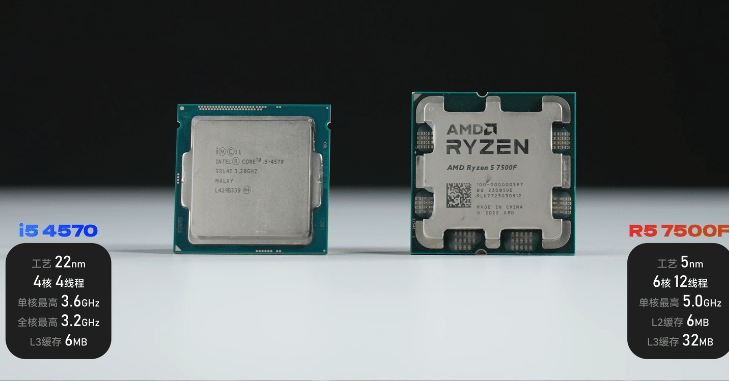
AMD processors are widely recognized for their lower power consumption under gaming loads, which allows systems to run more efficiently without drawing excessive electricity. This improved power efficiency directly contributes to better thermal performance, as the CPU generates less heat during extended gaming sessions.
As a result, temperatures remain more stable even when playing demanding titles for long periods. Thanks to this thermal efficiency, AMD CPUs are easier to cool and do not require expensive or high-end cooling solutions; a reliable mid-range air cooler is usually sufficient to maintain optimal temperatures and consistent performance.
Intel CPUs
Intel processors tend to draw more power under heavy gaming or multi-core workloads, which can significantly increase overall system power consumption. This higher power draw often means that stronger cooling solutions, such as high-performance air coolers or liquid cooling systems, are required to keep temperatures under control.
During extended gaming sessions, Intel CPUs can run noticeably hotter, especially when operating at high clock speeds for long periods. AMD generally offers better power efficiency and cooler operation, making it a more practical choice for gamers who prioritize lower temperatures, quieter systems, and reduced power usage.
Price-to-Performance Value
AMD Pricing
- Competitive mid-range CPUs
- Better value for gamers on a budget
- Longer motherboard support cycles
Intel Pricing
- Premium pricing for top-tier performance
- Higher motherboard and cooling costs
- Frequent platform changes
Platform Longevity and Upgradability
The AMD platform is well known for its longer socket support, allowing users to upgrade to newer CPUs without needing to replace their motherboard. This makes future CPU upgrades easier, more cost-effective, and far less disruptive, especially for gamers planning to improve performance over time.
Because of this extended compatibility and reduced upgrade costs, AMD systems are often considered a better long-term investment. In contrast, the Intel platform typically experiences more frequent socket changes, which often require users to purchase a new motherboard when upgrading to a newer generation processor.
While this approach can increase overall upgrade costs, it also allows Intel to introduce faster innovation cycles and adopt new technologies more aggressively. Verdict: AMD wins for long-term upgrade flexibility, particularly for users who want to upgrade gradually without rebuilding their entire system.
Best Choice for Different Types of Gamers
- High refresh rate gaming: Ensures smooth visuals and responsive gameplay, crucial for competitive esports.
- CPU-bound titles: Games that rely heavily on single-core performance benefit from faster CPUs.
- Maximum FPS focus: Competitive players aim for the highest possible frames per second to gain an edge.
- Recommended CPU: Slight advantage to Intel due to higher single-core speeds, though AMD remains very close and provides excellent performance at competitive settings.
AAA and Open-World Gamers

Story-driven games often rely on rich environments, complex AI, and detailed world-building, which place heavier demands on multi-core CPU performance. These games benefit greatly from processors that can efficiently handle multiple threads at once, ensuring smooth gameplay and minimal stuttering during intense scenes.
Additionally, long gaming sessions require stable performance and efficient thermal management, making multi-core capable CPUs ideal for maintaining consistent frame rates and system reliability over extended periods of play.
Streamers and Content Creators Who Game
- Gaming and streaming simultaneously: AMD processors handle gaming and live streaming at the same time more efficiently due to their higher core and thread counts, allowing gameplay to remain smooth while encoding video in the background without major frame drops.
- Video editing and rendering: Content creation tasks such as video editing, 3D rendering, and exporting large files benefit greatly from AMD’s strong multi-core performance, resulting in faster render times and improved productivity.
- Overall multi-tasking advantage: With better thread management and efficient workload distribution, AMD CPUs excel at handling multiple demanding tasks at once, making them ideal for gamers who also stream or create content.
Budget Gamers
For gamers on a budget, AMD processors often provide the most attractive option due to their affordability and excellent price-to-performance ratio. They allow for capable gaming builds without breaking the bank, delivering high performance at lower costs compared to equivalent Intel CPUs. This makes AMD an ideal choice for users seeking the best value per dollar, enabling them to enjoy smooth gameplay and modern features without overspending.
Software and Driver Support

| Brand | Software & Driver Support |
| Intel | Strong Windows optimization with advanced CPU scheduling improvements, resulting in smooth task management and consistent gaming performance. |
| AMD | Significant driver improvements in recent years have been particularly focused on gaming stability, compatibility, and smoother gameplay. |
| Overall | Both AMD and Intel now offer reliable, well-optimized driver support for modern games and gaming platforms. |
Conclusion
In conclusion, the AMD vs Intel for gaming debate highlights that there is no one-size-fits-all answer; both brands offer compelling advantages tailored to different types of gamers. Intel continues to excel in single-core performance, delivering slightly higher FPS in competitive and CPU-intensive esports titles where every millisecond counts.
Ultimately, the choice between AMD and Intel depends on your gaming priorities: if your focus is peak FPS in competitive titles, Intel may hold a slight edge; if you value multi-core performance, energy efficiency, long-term upgrade potential, and budget-friendly builds, AMD is often the smarter choice.
If you want to read an interesting article about it, explore our Tech category.
FAQs
It depends on your priorities. Intel offers slightly higher FPS in competitive esports and CPU-intensive games, while AMD excels in multi-core performance, modern AAA games, streaming, and multitasking.
Older titles that rely on single-core performance may favor Intel, but modern AMD Ryzen CPUs have significantly narrowed the gap, delivering competitive FPS even in legacy games.
Yes. AMD CPUs typically consume less power, run cooler, and require simpler cooling solutions, making them ideal for quiet and energy-efficient gaming setups.
AMD processors generally handle streaming and gaming simultaneously more efficiently due to higher core and thread counts, resulting in smoother gameplay and faster multitasking.
Consider your gaming style and budget. Choose Intel for competitive FPS-focused titles, and AMD for multi-core heavy games, AAA titles, content creation, long-term upgrades, and better value-per-dollar.

